Browsing the cluster
Everything about reading the cluster: tables, filters, custom columns, live metrics, the split workspace, the log viewer, namespace scope, and context switching. Keys referenced here are listed in keybindings.md.
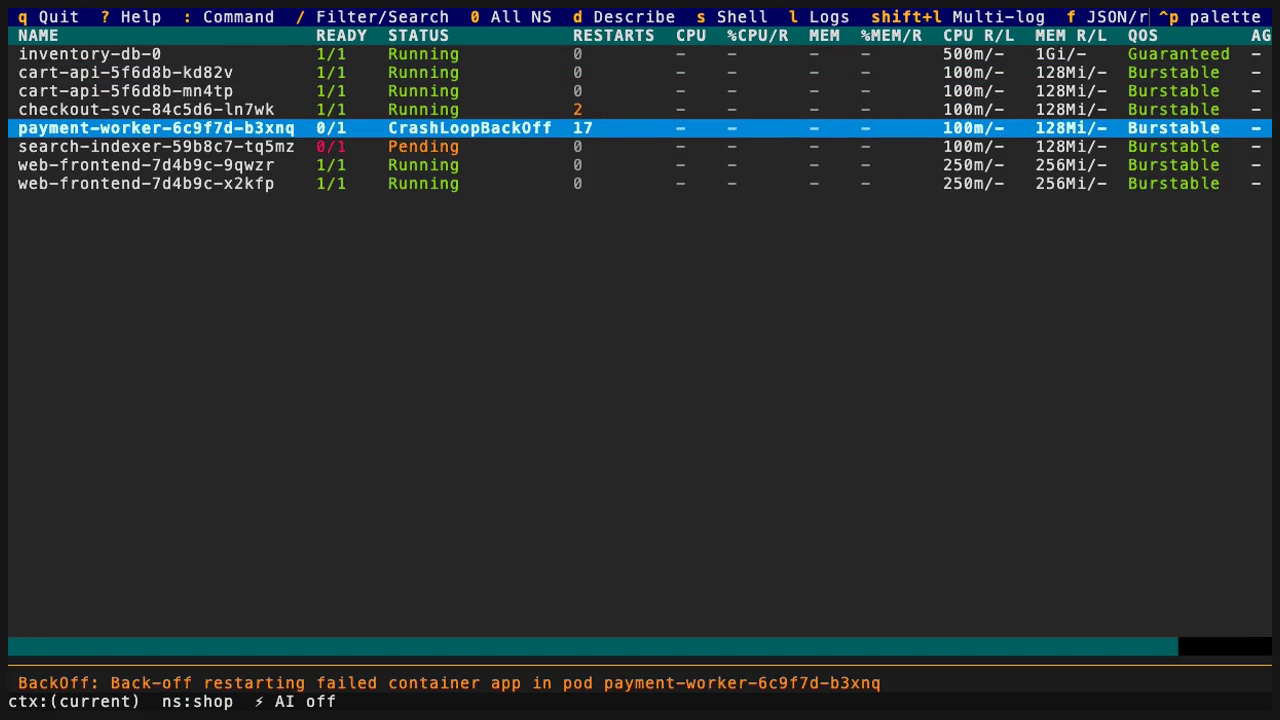
- Context and namespace stay visible while you navigate.
- Resource evidence is watch-backed and filterable in place.
- Effective keys follow the current view; ? shows the complete set.
Read the cockpit
The status row along the bottom is always on screen: current kube context
and the active namespace scope (or all). The key legend rides the top of
the screen and is collapsed by default to the few keys that matter most in
the current view (~ expands the full grouped legend). The selected row is
not a static snapshot: every table is watch-backed, so its fields update
live as the cluster changes underneath your cursor. It is still a view of
what korvid has watched — a describe, a log stream, or an agent tool
issues its own fresh read against the API server. Press ? at any time to
see the complete effective key set for the current view, including any
remaps from your config.
Use : to select a resource view. Tab completion includes both discovered
resource aliases and built-in commands. When API groups share a resource name,
use the qualified plural, such as :deployments.apps or
:helmreleases.helm.toolkit.fluxcd.io. The latter opens Flux resources;
:helm and :helmreleases continue to open the Secret-backed Helm browser.
Qualified views retain their resource identity through watches, describe, and
drill-down.
Ask in the way you already think
Three keys answer three different questions, so none of them replaces another:
:is for a destination you can name —:deployments,:ns prod,:ctx staging— plus the built-in commands, with tab completion over discovered aliases.?is the exhaustive reference: every effective key for every view, including your remaps.Ctrl-Psearches by intent. Typescale,restart, orcontextand korvid ranks matching app actions and:commands, each row reading category · what it does · how to run it. Selecting a row runs the same route that key runs, so a write still opens the same approval dialog and still waits for a fresh keystroke. Canonical spellings match exactly too: an action's own id (delete_resource), a command's text (pulse), and its:form (:pulse). An action that does not apply to the current view — or that applies but would do nothing right now, with nothing selected, no hint on the row, no search running, or a capability this session started without — stays searchable and shows why instead of disappearing. On a terminal too short to spare the room, the palette takes the height it needs so that reason stays readable rather than clipped — and resizing the terminal under the open palette re-draws the row you were on whole at the new size instead of cutting its last words.Esccloses the palette.
After an approved direct-TUI Deployment scale or rollout restart, korvid
separately tracks whether the controller converges. API acceptance is never presented as
completion. Open the newest retained result with :outcomes or Deployment
operation result in the Action Palette. The bounded tracker reports
completed, stalled, superseded, replaced, stopped, or incomplete evidence and
retains at most three results for roughly five minutes of observation.
Context switching stops old-cluster trackers before the client is replaced.
From the result screen, Pod navigation, events, describe, and logs revalidate
the exact Pod UID; a replacement is refused instead of silently retargeted.
Follow one signal
Not sure which resource to inspect? The one-line Pulse summary
continuously exposes current findings, recent Warning observations, and gaps
without moving the workspace. :pulse / :problems open the detail; Enter
verifies the selected resource's UID before using normal navigation. Recent
events are not a claim that the problem is still active.
A typical investigation starts at a troubled row and ends at its cause:
/filters the table down to the workload you care about (name,~fuzzy,/regex/, a label selector, or-sto hide Completed).ddescribes the selected resource — its manifest and recent events — for the full picture behind a status likeCrashLoopBackOff.lopens the log pane for the selected pod (Lmerges the first 8 currently filtered pods instead).gopens the operational relationship graph: the resource's direct dependencies and its direct dependents — one hop each way — with a coverage banner stating how complete that view is.dtoggles a bounded transitive expansion of the dependents side; see resource-relationships.md for its depth and node caps.
Work with logs
L streams the first 8 currently visible pods' logs together, each line
prefixed [pod/container]; when more pods match, a notification names the
cap and how many matched rather than quietly widening the stream. f
toggles between raw text and colour-highlighted JSON for lines that look
like JSON; p reloads the pane from the previous (terminated) container
instance. / opens inline search in the pane, and n / N jump between
hits. The pane holds a bounded ring buffer of 5000
lines — a one-time banner marks the pane once older lines have been
dropped. Streams reconnect automatically on a transient error or an
unexpected EOF; after five consecutive failed attempts the header shows an
error state and a notification is raised.
Change scope without losing context
korvid always watches exactly one explicit scope. The startup namespace
resolves from -n/--namespace, then namespace: in
~/.config/korvid/config.yaml, then your kubeconfig context's namespace,
then default. Switch with :ns <name>, the :ns picker, 0 for
all-namespaces, or a 1–9 namespace shortcut. A
watch denied by RBAC stops with one concise notice instead of retrying or
fanning out into other namespaces.
Both :ns <name> and the namespace picker preserve the current resource view;
selecting a namespace while browsing deployments does not switch to pods.
Namespace shortcuts
Keys 1–9 are namespace slots. Your favorite_namespaces are pinned to
the first slots in their configured order. The first time you switch to
another namespace with :ns <name>, :<view> <name> or the namespace picker,
it takes the lowest free slot, so the namespaces you actually work in get
numbers in the order you first visit them. A namespace the latest listing does
not contain (a typo) gets no slot. Pressing a slot key only switches scope,
and listing namespaces never assigns a slot or navigates.
Automatic slots are stable. A namespace keeps its number on every later
refresh and after a restart: korvid saves the assignment per cluster (context
name and API server) in $XDG_STATE_HOME/korvid/namespace-slots.json. A
namespace that disappears from the listing keeps its number but is marked
unavailable, so the key is refused instead of reused. When it reappears, the
same key works again.
? lists the current slots, and the :ns picker shows each namespace's slot
number. Once all nine are taken, other namespaces stay reachable through the
picker and :ns <name>. To repack the slots, run :slots (or :ns-slots).
It drops the namespaces that are no longer listed and moves the rest up, in
their current order, so the freed numbers come back. It previews every slot
that would change and saves only after you confirm with Enter; Esc keeps
the current slots. :slots touches neither your configuration nor your
keybindings.
If the namespace listing fails or RBAC denies it, korvid keeps the last known
slots, marks the map as stale in ?, and never probes namespaces one by one.
Pinned slots and :ns <name> keep working. After a :ctx switch, only pinned
slots answer until the new cluster's saved slots are restored.
:ctx switches kubeconfig context. korvid probes the target first — loads
its credentials in isolation and runs a self-access review — so an
unreachable or expired context fails with a toast while you stay connected
to the current cluster; only a successful probe tears down watches,
port-forwards, and log streams and retargets everything at the new
cluster. Ctrl-W v splits the workspace into two independent panes (own
kind, namespace, and filter); Ctrl-W w moves focus, Ctrl-W q closes the
focused pane.
Shape the table
Add columns sourced from labels, annotations, or a bounded JSONPath subset
under views: in config.yaml:
Use a qualified key such as helmreleases.helm.toolkit.fluxcd.io to configure
one API group independently. Qualified settings take precedence over a bare
plural default, and the same choice is used for values, headers, sorting, and
agent resource listings. The synthetic Helm browser does not inherit a Flux
view's columns.
Custom-column values support Rich markup. Malformed markup, such as an
unmatched [/], is displayed literally instead of stopping the TUI, including
when a watch updates the value.
The pods table's %CPU/R / %MEM/R columns are always relative to the
declared request (CPU and MEM show absolute usage), but their colour
keys off the most severe limit the usage approaches across every
applicable ceiling (container and, on K8s 1.34+, pod-aggregate) — never off
the request alone. Only when no limit bounds the usage does the colour fall
back to the request ratio, capped at yellow: bursting above a request is
expected, never critical. Without metrics.k8s.io installed the columns
show - and korvid keeps polling, picking up a later install with no
restart.
Preview impact before a write
Delete, rollout restart, a known workload scale-down, and Pod resize show an advisory graph-derived impact section above the dry-run preview in their approval dialog — see Operations for the full guarded-write path all of them share. The section is matched to the selected row by exact identity, UID included: when a row carries no UID the section is omitted entirely rather than guessing by name.
For example, S (scale) only loads and summarizes this section when
korvid can tell the requested count is a known decrease — a scale-up, a
no-op, or a row whose current count can't be read gets the ordinary
old -> new confirmation with no graph section at all.